
JioSaavn - Music & Podcasts
Saavn Media LimitedMusic & Audio
4.32.03K Reviews
- Version
- Varies With Device
- Installs
- 500.00M
- Age Rating
- Everyone
Screenshots
Our Review of JioSaavn - Music & Podcasts
 Analysis by Appyee
I judge a music app not only by what I can play, but by how clearly I can understand the choices I’m making while using it. JioSaavn is a music and audio app from Saavn Media Limited, and its focus on music in many languages gives it a distinct place among streaming services. It is free to install, rated for Everyone, and has an average rating of 4.3 from around 8.7 million ratings, with over 500 million installs. That scale may make it easy to discover, but I’d still decide whether it suits me by looking at the listening experience and the controls I actually use.
Diving into the World of JioSaavn
First things first, JioSaavn has this way of making you feel like you’ve stumbled upon a hidden gem. It’s like that cozy coffee shop you accidentally find and instantly love. The app offers a vast library of music and podcasts, and trust me, it’s got something for everyone. From Bollywood hits to international tracks and indie tunes, it feels like a world tour for your ears.
What the app is best suited for
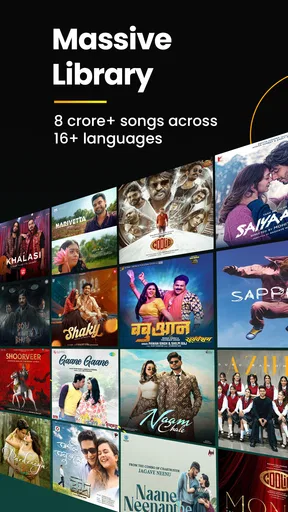
The strongest reason I’d try JioSaavn is language choice. The service supports music in 16 languages, which is useful if your listening jumps between regional favorites, Hindi film songs, and international tracks. Rather than keeping separate apps for different parts of that routine, I can use one place to search, save, and return to music that belongs to different parts of my day. That breadth is more meaningful than a large library in the abstract: it helps when a family shares listening tastes but not necessarily a first language or genre.
It also suits someone who wants a mix of deliberate listening and quick background play. I might search for a particular song on the way to work, then let a playlist carry on while cooking or tidying up. If I already know what I want, search matters most; if I’m undecided, the home screen’s playlists and recommendations give me a starting point. I wouldn’t treat recommendations as a substitute for searching, though. When I have a specific regional version or recording in mind, checking the song title and artist before tapping play is a sensible habit.
Interface and User Experience
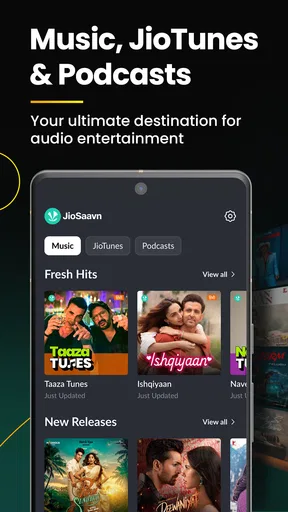
So, let’s chat about the interface. It’s sleek, it’s modern, and most importantly, it’s user-friendly. I’m not a tech wizard, but navigating through JioSaavn was as smooth as a Sunday morning. The home screen is neatly organized, featuring playlists that suit your mood, trending tracks, and even personalized recommendations.
One of the things I loved was the search functionality. It’s fast, efficient, and surprisingly intuitive. Whether you’re looking for a specific song or exploring new genres, it feels like the app just gets you. No more endless scrolling or random guesses!
A practical listening routine
For a realistic everyday test, picture a commute where mobile reception comes and goes. Before leaving, I’d find the tracks or playlist I expect to want and download them while connected, then check that the saved items are available before relying on them offline. That small check can prevent the familiar disappointment of discovering that a download did not finish after the signal has already disappeared. I’d also keep a few different kinds of listening together—something energetic, something familiar, and a longer podcast—so I’m not forced to browse when I’m already on the move.
There is a useful trade-off here: downloading is a preparation step, not a replacement for planning. A large playlist can take more time and device storage than a handful of favorite songs, so I’d save only what I’m likely to play during a trip and refresh that selection when my plans change. For a short walk with reliable data, streaming may be simpler. For a flight or a route with patchy coverage, offline preparation is the better choice, provided the downloads are ready beforehand.
Music and Podcast Library
Now, let’s get to the heart of it—the content. The music library is, in one word, massive. You’re looking at millions of tracks across multiple languages and genres. Whether you’re into pop, rock, classical, or that niche indie vibe, it’s all here. And the quality? Crystal clear. It’s like having a concert in your pocket.
But wait, there’s more! The podcast section is just as impressive. I found myself diving into some fascinating stories and insightful talks. Whether you’re into true crime, comedy, or self-improvement, JioSaavn delivers a variety that keeps you coming back for more.
Choosing between music and podcasts
The mix of spoken audio and songs is handy if I want one app for different listening moods, but I wouldn’t assume every listener will prefer that arrangement. Someone who mainly follows podcast series may value a dedicated podcast app’s organization and listening tools more, while a person who mostly wants a broad music catalogue may compare JioSaavn with other streaming services on language coverage, discovery, and subscription terms. The right comparison is not simply “which app has more”; it is whether the music I actually seek and the shows I follow are easy to find and return to.
One practical way to judge the catalogue is to search for a few specific artists, songs, and podcast episodes before committing to a regular routine. Try both a familiar title and something less mainstream that matters to you. That gives a better sense of whether the app serves your own listening than browsing only the prominent recommendations. It also helps avoid building playlists around tracks that aren’t the versions you intended to hear.
Features That Stand Out
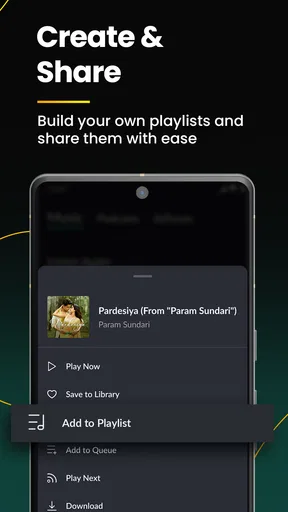
One feature that really caught my eye was the offline mode. We’ve all been there—no internet, no music, just silence. But with JioSaavn, you can download your favorite tracks and playlists to enjoy them anywhere, anytime. It’s a lifesaver for those long flights or road trips.
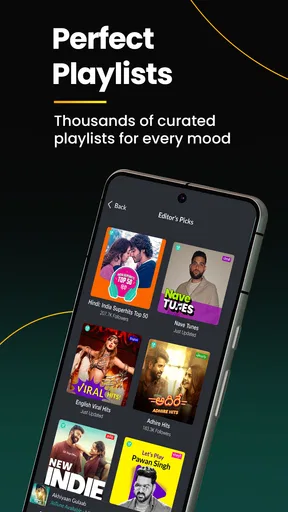
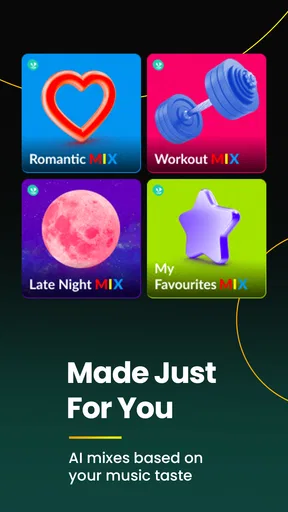
Another highlight is the curated playlists. They’ve got these handpicked playlists that adjust to your mood, be it a workout session, a chill evening, or a late-night jam. It feels like having a personal DJ that knows exactly what you need.
Trust, privacy, and everyday choices
For me, trust is not something I can infer from popularity or a polished interface. I look for clear explanations of what a service asks from me and what choices it gives me. I don’t use an app’s music recommendations as evidence about its privacy practices, and I wouldn’t assume that any particular permission is necessary without seeing the request and its explanation on my own device. If a prompt appears, I pause to read it and consider whether the requested access makes sense for the action I’m trying to take.
That is especially worth doing around account setup, playback, and downloads, since those are moments when people may tap through screens quickly just to get to the music. I’d review the choices shown in the app and on the device rather than granting access automatically. If I’m setting up a shared phone or helping a family member, I’d also make sure the person who will use the account understands which options they selected. Those are simple habits, not a claim about a specific data practice.
There’s a similar distinction with account controls: I’d look for the settings and choices visible to me rather than assume that a particular control exists or works a certain way. Before making a long-term listening routine, it’s reasonable to check how the app presents account preferences and any available subscription or content options. My standard is straightforward: I want to understand the choice in front of me before I make it, and I don’t treat an app’s popularity as a substitute for that check.
Free access and subscription trade-offs
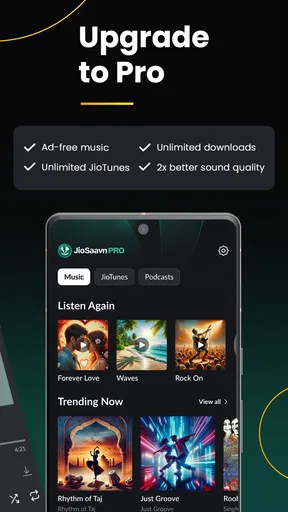
Let’s talk numbers. The app is free to download, and you can enjoy a ton of content without spending a dime. But, if you’re like me and can’t resist the allure of ad-free listening and high-quality audio, the subscription is totally worth it. It’s reasonably priced, and they often throw in some sweet deals.
Because paid options can vary, I’d check the purchase screen for the current terms before subscribing; in-app purchases range from about 49 cents to about 60 dollars per item. I would not pay simply because an upgrade sounds appealing. First I’d use the free experience long enough to see whether its listening interruptions, available choices, and audio options matter to my own routine. If I mostly play a few saved songs at home, a paid plan may not add enough value; if I listen often and the offered benefits address a real annoyance, the calculation is different.
Compared with the usual alternatives, JioSaavn’s most practical point of difference is its emphasis on multilingual listening alongside music and podcasts. Another service may be a better fit if its catalogue more reliably covers the artists I follow, if I prefer its discovery tools, or if I already use its wider ecosystem. I’d compare actual search results and the terms shown in each app instead of choosing based on a general reputation. Streaming services can look similar at first glance, but the small details that matter are the songs I can find, how I like to browse, and whether the paid features justify their cost for me.
Who should try it, and who may prefer something else
I’d recommend giving it a try if your playlists cross language or genre lines, you want music and podcasts in one app, or you like having both search and curated listening as options. It is also a reasonable starting point if you want to explore before paying, since the app is free to download. Its Everyone content rating makes it broadly accessible, though that label does not tell me whether every individual track or show will suit every listener, so I’d still choose content with the intended audience in mind.
I’d be more cautious if you need a particular artist’s complete catalogue, dislike browsing recommendations, or want a service whose subscription benefits are already clear and essential to you. In those cases, test the exact content and compare the plan details first. People who mainly listen to podcasts may also prefer a dedicated option if its episode management better matches their habits. And if you rarely have a reliable connection but don’t want to prepare downloads, an offline-first listening setup may be less frustrating than depending on streaming.
On Android, the stated minimum operating-system requirement is version 8.0, so I’d check the device’s software before trying to install it. The app is also available on iOS, making it a possible choice for households using different phone platforms, although I’d still judge the experience on the device I plan to use. That small compatibility check is more useful than assuming a familiar app will run smoothly on every older phone.
Subscription and Accessibility
Plus, the app is available for both Android and iOS, so no one’s left out. And it doesn’t matter if you’re in India or halfway across the world, the app’s accessibility is top-notch.
Final Thoughts
In the ever-expanding universe of music apps, JioSaavn feels like a breath of fresh air. Whether you’re a music enthusiast or a podcast junkie, this app promises endless entertainment. It’s the kind of app that once you start using, you wonder how you ever lived without it.
So, if you’re on the hunt for a music and podcast app that’s got it all, give JioSaavn a spin. You might just find your new favorite corner of the internet. Happy listening!
Verdict
Strengths of JioSaavn - Music & Podcasts
- Extensive library with diverse music.
- High-quality audio streaming available.
- User-friendly interface and navigation.
- Offline download for premium users.
- Personalized playlists and recommendations.
Limitations of JioSaavn - Music & Podcasts
- Ads in the free version can be intrusive.
- Limited offline access in free mode.
- Some songs are region-restricted.
- Premium subscription needed for full features.
- Occasional app crashes reported by users.
Similar Picks in This Category
View All
YouTube Music
Google LLC4.4

Samsung Music
Samsung Electronics Co., Ltd.3.8

Spotify: Music and Podcasts
Spotify AB4.3

Lark Player:Music Player & MP3
Lark Player Studio - Music, MP3 & Video Player4.6

StarMaker: Sing Karaoke Songs
SKYWORK AI PTE. LTD.4.3

Shazam: Find Music & Concerts
Apple Inc.4.8
You May Also Like
View All
Frequently Asked Questions
What is JioSaavn and what features does it offer?
JioSaavn is a popular music and podcast streaming app available for Android and iOS. It offers a vast library of songs across various genres and languages, including Bollywood, English, and regional music. The app also features curated playlists, personalized recommendations, and a wide selection of podcasts, making it a comprehensive platform for audio content.
Is JioSaavn free to use, or does it require a subscription?
JioSaavn offers both free and premium subscription models. The free version includes ads and limited features, while the JioSaavn Pro subscription removes ads and provides benefits like offline listening, high-quality audio, and exclusive content. Users can choose the plan that best suits their needs, and there are often promotions for new subscribers.
Can I download songs for offline listening on JioSaavn?
Yes, JioSaavn Pro subscribers can download songs and playlists for offline listening. This feature allows users to enjoy their favorite tracks without an internet connection, which is especially useful for traveling or areas with limited connectivity. The downloaded content stays accessible as long as the subscription is active.
What devices and platforms are compatible with JioSaavn?
JioSaavn is compatible with both Android and iOS devices, available for download from the Google Play Store and Apple App Store. Additionally, it supports web browsers, allowing users to stream music directly on their computers. The app integrates seamlessly with smart speakers and other connected devices for a versatile listening experience.
How does JioSaavn personalize music recommendations?
JioSaavn uses advanced algorithms to analyze listening habits, preferences, and user interactions to offer personalized music recommendations. By curating playlists based on individual tastes and trends, the app ensures a tailored listening experience. Users can also explore editor-picked selections and trending charts for fresh content.
